JOEY MCDOUGAL · JMEAM CONSULTING LLC
Useful ideas.
Made tangible.
Practical tools for maintenance work, from yellow iron to the transport fleet. Drive the yard and meet them.
Scroll, swipe or use the arrow keys.
01 / JOEYI KEYBOARD
Scan.
Speak.
Keep working.
Scan an asset QR code into the field. Dictate the note. Review the detail. All from one keyboard.
- QR scanning
- Speech to text
- Everyday typing
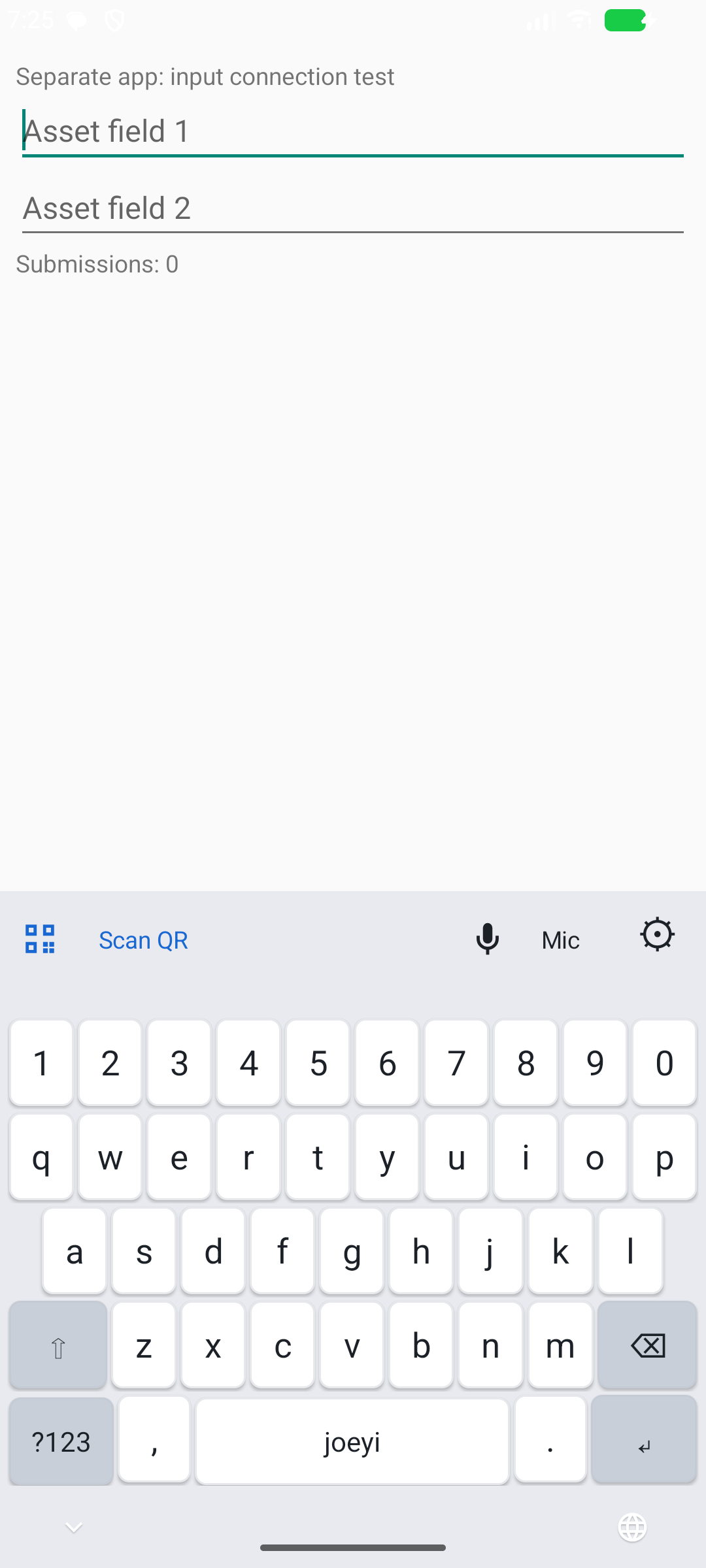
Actively developed Android product. Click the loader or the phone for details.
ANDROID KEYBOARD · IN DEVELOPMENT
Scan. Speak. Keep working.
Asset checks, warehouse inventory, inspection notes, and everyday typing. joeyi puts the tools for all three on one keyboard.
Find the asset without retyping its number.
Tap the active text field, select Scan QR on the keyboard, and aim at the label. joeyi inserts the QR code’s text into the field.
Use a QR code containing the asset number itself.
Capture the note while the detail is fresh.
During an inspection, tap Mic and dictate your observation. The recognized speech becomes text in your note field, ready to review and correct.
Speech recognition depends on microphone access and recognition support on the device.
Put the cursor where you need it.
Slide your thumb across the Space key to move the cursor, then fix the detail. Keep letters, numbers, and symbols available for the rest of the note.
Beyond asset checks
A warehouse may have barcode labels without a dedicated inventory app. In a compatible search or entry field, joeyi can help bring a supported label’s value into the task without retyping it.
Label-format support depends on the keyboard scanner. Review the value before using it.
Comfort matters, too
- Dark or lightChoose the appearance you prefer.
- Adjustable heightPick a keyboard height that feels comfortable.
- Scan controlsFlashlight when you need more light, with sound and vibration feedback on a successful scan.
Designed for compatible text fields in Android apps.
02 / WORK ORDER APP · COMING SOON
Maintenance
in your hands.
An Android app for technicians: assigned work orders, details, comments, labor, attachments and completion. Oracle eAM stays the system of record, with MuleSoft as the integration boundary.
- Oracle eAM
- MuleSoft
- Android
- Coming soon
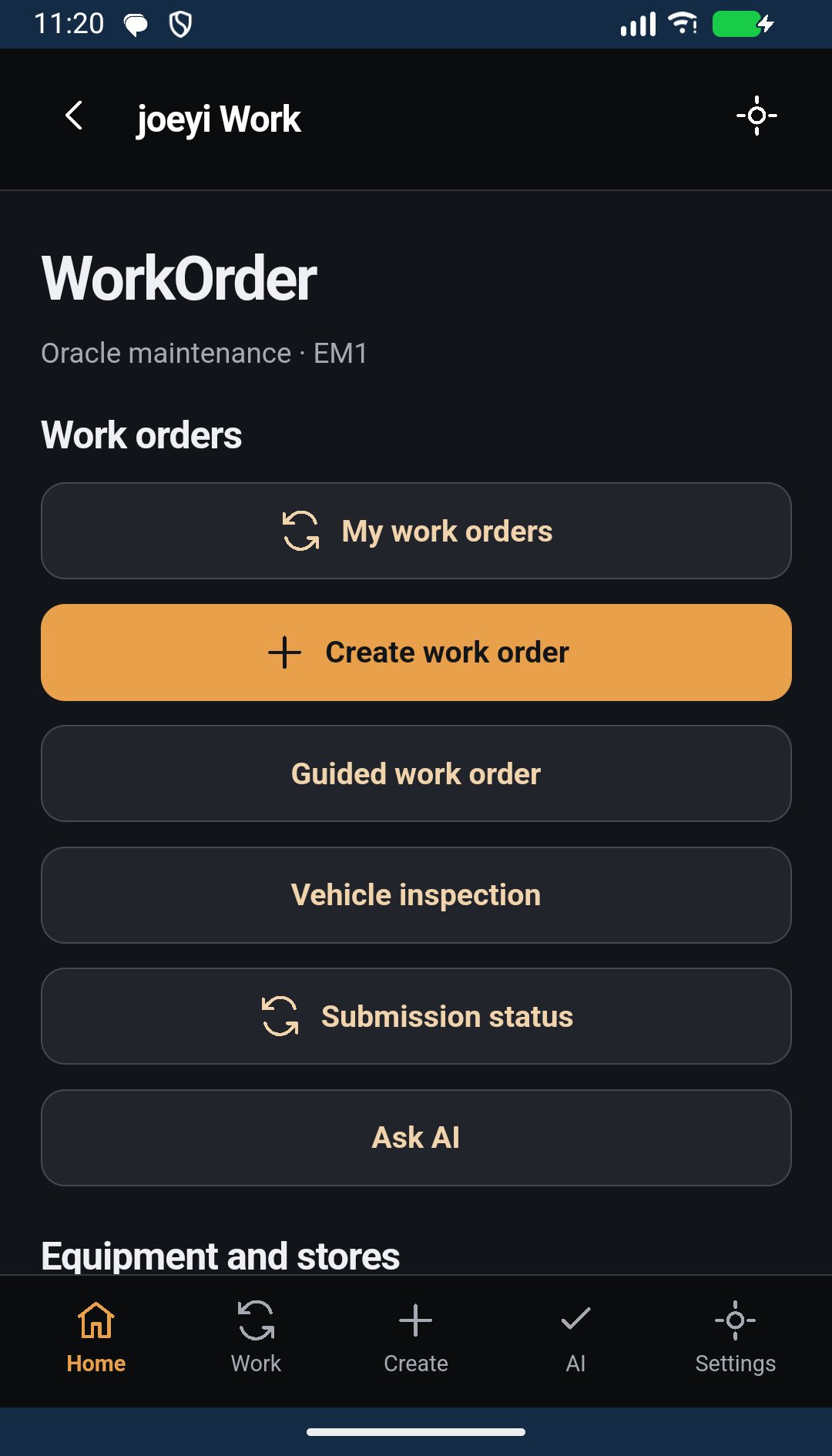
In development. Illustrative units. Click a truck or the phone for details.
WORK ORDER APP · COMING SOON
Maintenance in your hands.
An Android maintenance app for technicians. Oracle eAM is the system of record, and MuleSoft is the integration boundary between the app and Oracle.
The first milestone
Sign in
Corporate sign-in, with your employee, site and permissions resolved for you.
See your work
A technician dashboard and your assigned work orders, with filters.
Open a work order
Details, operations, safety instructions and required parts.
Record the work
Comments, labor, and photo or file attachments with upload and posting status.
Complete it
A completion review with the required codes and an explicit confirmation.
How it is built
- Oracle eAMOracle owns the authoritative maintenance records. The app does not connect to Oracle directly.
- MuleSoftMuleSoft authenticates and authorizes each request, validates business rules and reports transaction status.
- OfflineAssigned work is cached, and drafts and queued changes are saved, so the work continues without a connection.
- TrackingTransaction history, actionable errors and safe retries. A work order shows as completed only after Oracle confirms it.
Coming soon. The screen shown is from the development build and may change.
03 / eAM SCHEDULING TOOL
Give the job
a place in the plan.
Your weekly maintenance scheduling workbench. Import the open work orders, plan the week, book the crew, check capacity, and export.
- Import
- Plan
- Schedule
- Check
- Export
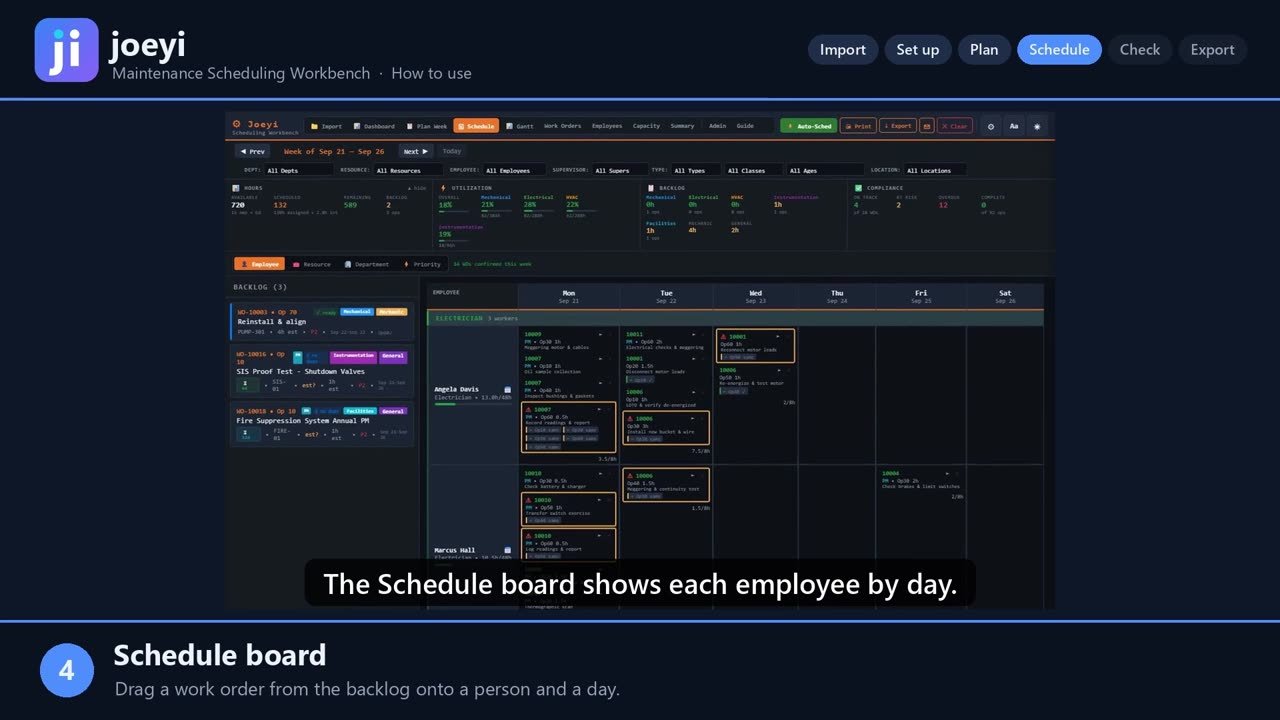
The board in the yard is an illustration. Click it or the machine in the bay for details.
eAM SCHEDULING TOOL · WEEKLY WORKBENCH
Import, plan, schedule, check, and export.
Your weekly maintenance scheduling workbench. joeyi is one file that runs in your browser, and your schedule stays on your own PC.
Your week, step by step
Import
Drop in this week’s open work order extract from Oracle EAM. joeyi reads every work order, with its location, department, priority, and due dates. Pick your location in the filter bar, so you only see your own work.
Set up
Add each employee or contractor, with their craft, supervisor, and location. Give each person a shift, and use availability for vacation, training, or short days. Those hours come off the board automatically.
Plan
Plan Week lists every open work order by priority. Check the ones you want, or use Confirm Top N to take the highest priority work that fits your crew. Auto-Sched books the remaining hours to named workers, respecting shifts, availability, and dependencies.
Schedule
The Schedule board shows each employee by day. Drag a work order from the backlog onto a person and a day. Switch between the employee, resource, department, and priority views, or see the week as a Gantt timeline.
Check
The Dashboard shows schedule compliance, PM compliance, utilization, and backlog in weeks. Capacity shows hours booked against hours available, for every person and every day. Red means someone is overbooked.
Export
Print the weekly schedule for your supervisors and crews, then export. Every export is a revision of that week, and joeyi carries your estimates and edits forward.
- OvertimeIf you book someone outside their shift, joeyi warns you, and marks those hours as overtime.
- Look backLoad an earlier export, and joeyi reopens the plan exactly as it was.
The board in the yard is an illustration. The how-to video shows the tool itself. It works from a work order extract, not a live eAM connection.
04 / DATAFLOW FOR ORACLE EBS eAM
One run.
Parents first.
DataFlow has two ways to load Oracle EBS eAM data. A recipe keys the Oracle form for you, like a data loader, but with ease. For larger loads, the built-in API loader runs the whole chain in dependency order, parents first.
- Recipe loader
- API loader
- Tested each step
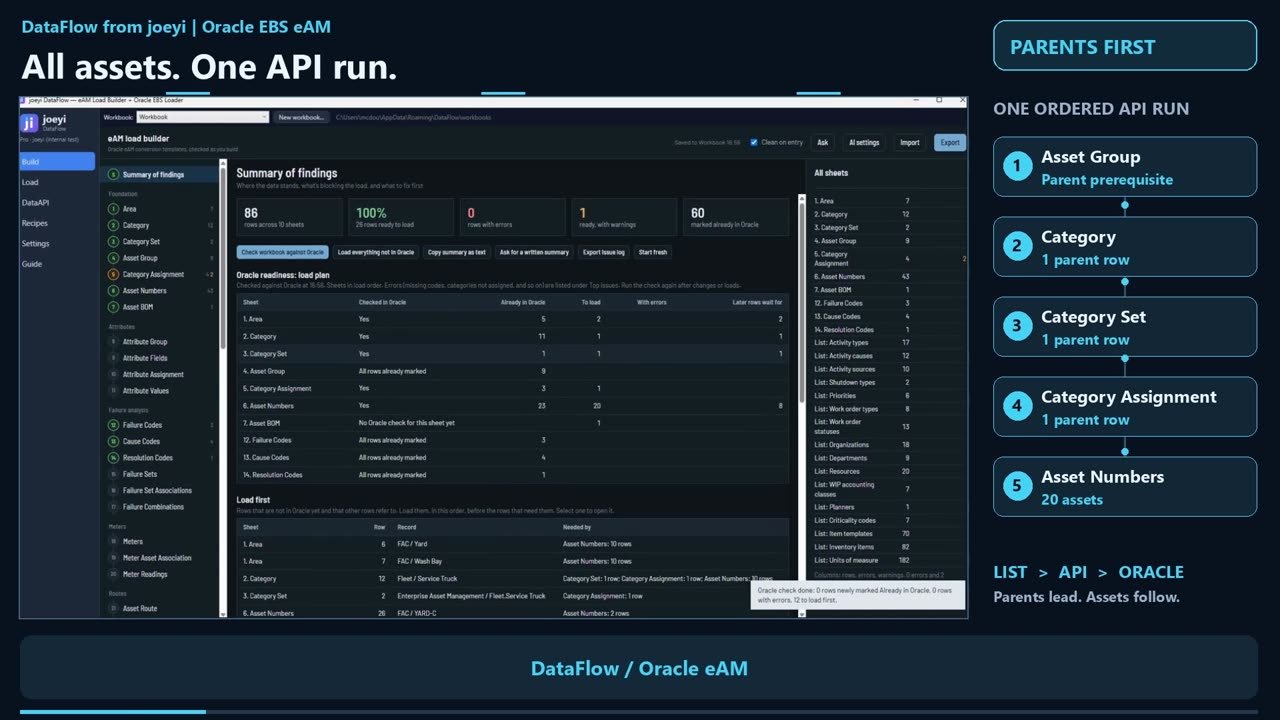
Click a trailer or the Oracle pillar for details.
DATAFLOW · FOR ORACLE EBS eAM
One run. Parents first.
Asset group comes first. The parent records must be ready before the assets that depend on them.
Two ways to load
- RecipeKeys the Oracle form for you, like a data loader, but with ease. You teach it without code: pick a column, then click its field in Oracle.
- API loaderBuilt in, for larger loads. It loads through the Oracle APIs in dependency order, each step tested first.
The API chain, in order
Asset group
Category
Category set
Category assignment
Asset numbers
One action starts the chain. Each step is tested, then loaded through the Oracle APIs.
- Demonstration runAll twenty assets loaded through the Oracle APIs. One run, parents first.
The overview shows a demonstration run.
05 / PROJECT COMMAND CENTER
The status answer
in one screen.
A complete project workspace that lives in a single file. No server, no account, no installation. Board, timeline, risks, issues and status reports, all from the same data.
- Board
- Timeline & Gantt
- Risks & issues
- Status reports
Screens show a sample project. Click the site office or the screens for details.
PROJECT COMMAND CENTER · OFFLINE PROJECT WORKSPACE
A complete project workspace in a single file.
No server, no account, no installation, and no internet connection. Everything you create stays on your computer until you choose to export it.
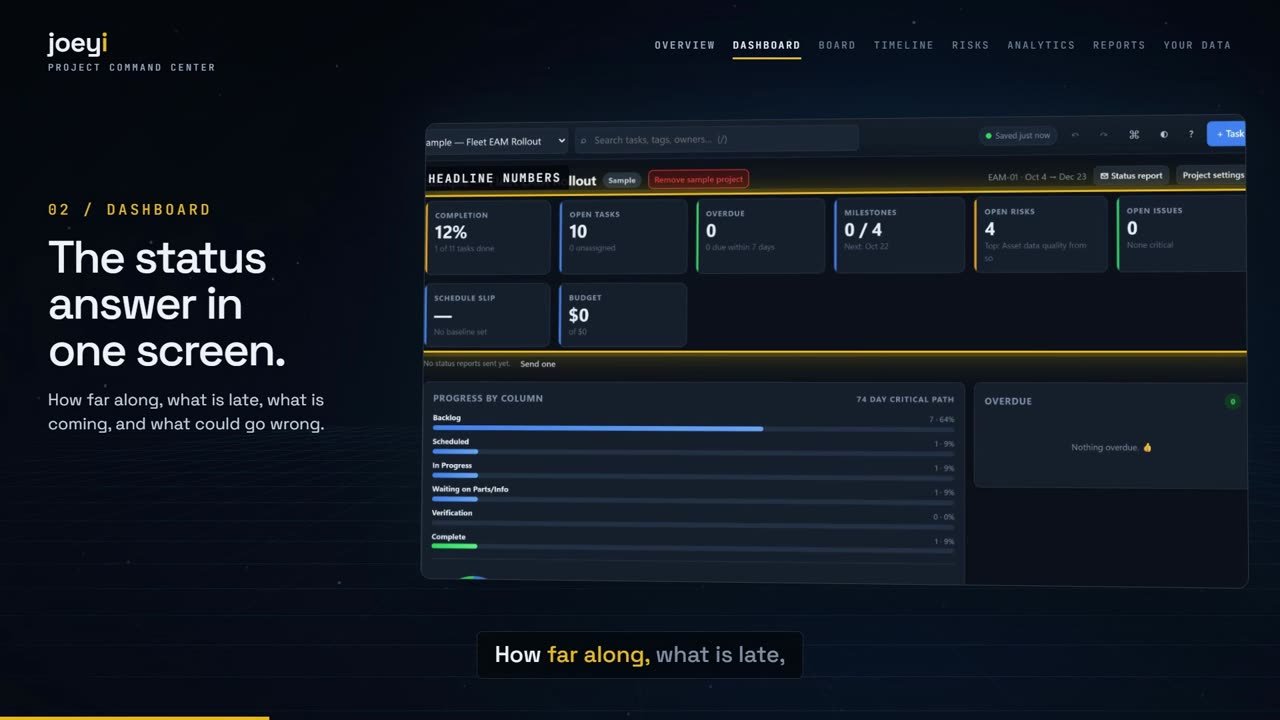
Nine ways to look at the same data
- DashboardThe status answer in one screen: how far along, what is late, what is coming, who is loaded up, and what could go wrong.
- BoardA Kanban board where columns are your workflow stages. Drag cards between them to change status.
- Timeline & GanttBars positioned by start and due date, with dependency arrows and the critical path highlighted.
- AnalyticsCharts drawn from the same data, useful for a weekly review, including burn-up and forecast.
- RisksA standard register plus a 5×5 probability-by-impact heat map.
- Issues logA standalone log for things that are broken, in the systems you work with.
- Status reportsA print-ready report written for one of three audiences (Executive, Management, Team), plus a dialog that turns it into an email.
- Tasks table and calendarEdit many tasks at once in the table, or see the month with tasks on their due dates.
Your data stays with you
- SavingThere is no Save button. Every change is written to the browser’s own storage on your PC.
- ExcelExport the full project to Excel, change it there, drop it back on the window, and the project is rebuilt from what you typed.
- TemplatesStart from a blank project, a general delivery plan, or an EAM / maintenance program template.
The screens in the yard are illustrations using the sample project from the user guide.
START WITH THE WORK
What would make
your next task easier?
I’m Joey McDougal. I build practical tools around the way people work. Talk with me about the keyboard, scheduling, DataFlow, Project Command Center, or the task behind them.
JMEAM Consulting LLC · © 2026 · 3D yard and machines built in-house · Three.js (MIT)